Building a “Human-like” Auto Reading Script 4 LinuxDO
Sometimes you don’t want a bot that behaves like a bot. You want something that feels like a real user: scrolling, pausing, switching topics, even “thinking” for a bit.So~ I just got a new idea 4 this
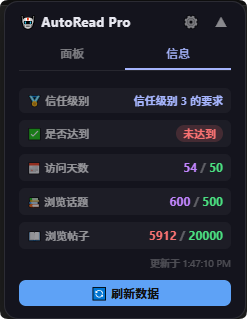
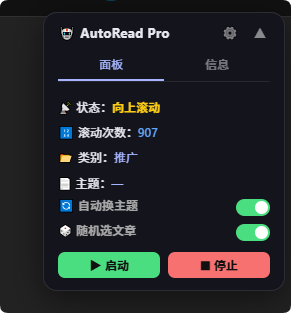
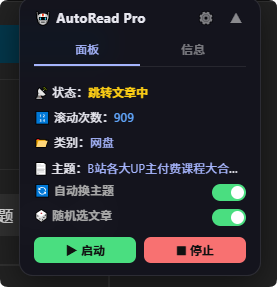
This small Tampermonkey script is my attempt to simulate that behavior on the LinuxDO forum.
1.The Idea
Instead of aggressively scraping or blasting requests, the script:
- Scrolls like a human (random speed, direction changes)
- Pauses occasionally (top/bottom delays)
- Switches topics naturally
- Detects user interaction and backs off
- Keeps running even in background tabs (via Web Workers)
It’s not about automation alone — it’s about blending in.
2.Core Design
The script is built around a simple state machine:
Idle → Start → Scroll → Pause → Switch Topic → Repeat
Key concepts:
- State management → tracks whether the script is running
- Randomization → avoids robotic patterns
- Worker timers → bypass browser throttling
- User interrupt detection → stops when you interact
3.Key Features
3.1 Human-like Scrolling
function doScroll() {
  const step = CONFIG.scrollStep + Math.random() * CONFIG.randomOffset;
  window.scrollBy(0, step);
}
- Random scroll distance
- Smooth step-based scrolling
- Direction switching (down → up → next article)
3.2 Background-safe Timers (Web Worker)
const WORKER_CODE = `
  let timer = null;
  self.onmessage = function(e) {
    if (e.data.type === 'start') {
      if (timer) clearTimeout(timer);
      timer = setTimeout(() => {
        self.postMessage({ type: 'tick' });
      }, e.data.delay);
    }
  };
`;
So, why this matters:
- Browsers throttle
setTimeoutin inactive tabs - Workers don’t get throttled as aggressively
3.3 Auto Topic Switching
function goToNextCategory() {
  const cat = CATEGORIES[Math.floor(Math.random() * CATEGORIES.length)];
  window.location.href = cat.url;
}
- Random category selection
- Mimics “browsing curiosity”
3.4 Smart Click Detection
function onPageClick(e) {
  if (e.target.closest('#ar-panel')) return;
  STATE.lastClickTime = Date.now();
}
- Detects real user interaction
- Temporarily pauses automation
- Prevents interference
3.5 Chunked Request Simulation (Connect Panel)
The script also fetches user stats using a custom curl-based request:
GM_xmlhttpRequest({
  method: 'GET',
  url: 'https://connect.linux.do/',
  headers,
  onload(res) {
    const doc = new DOMParser().parseFromString(res.responseText, 'text/html');
    onDone({ data: extractConnectData(doc) });
  }
});
:)This allows:
- Reading protected pages via cookies
- Displaying user progress in a panel
UI Panel (Minimal but Functional)
The floating panel includes:
- Start / Stop controls
- Toggle switches (auto topic / random article)
- Real-time status display
- Connect info dashboard
It’s intentionally compact and non-intrusive.
Why This Approach Works
Most automation scripts fail because they:
- Move too fast
- Act too predictably
- Ignore user interaction
- Break in background tabs
This script avoids that by:
Simulating behavior, not just executing actions
Limitations
- Not a full crawler (by design)
- Depends on DOM structure (may break if site updates)
- Requires manual curl config for Connect data
Final Thoughts
If you think about it, this isn’t just a script.
It’s a small experiment in behavior simulation:
Instead of telling the browser what to do, we try to imitate how a human would do it.
Full Script
// Wrote by ClaudeCode and Chengxin
// ==UserScript==
// @name LinuxDO 自动阅读助手 Pro
// @namespace http://tampermonkey.net/
// @version 4.1.1
// @description 自动滚动 + Connect 信息面板 + 后台不节流
// @author You
// @match https://linux.do/*
// @grant GM_xmlhttpRequest
// @grant GM_setValue
// @grant GM_getValue
// @connect connect.linux.do
// ==/UserScript==
(function () {
'use strict';
const CONFIG = {
idleTimeout: 5000,
scrollStep: 280,
scrollMinInterval: 1000,
scrollMaxInterval: 5000,
randomOffset: 120,
bottomWait: 2000,
topWait: 1500,
};
const CATEGORIES = [
{ name: '开发', url: 'https://linux.do/c/develop/4' },
{ name: '国产', url: 'https://linux.do/c/domestic/98' },
{ name: '福利', url: 'https://linux.do/c/welfare/36' },
{ name: '资讯', url: 'https://linux.do/c/news/34' },
{ name: '网盘', url: 'https://linux.do/c/resource/cloud-asset/94' },
{ name: '文档', url: 'https://linux.do/c/wiki/42' },
{ name: '积分', url: 'https://linux.do/c/credit/106' },
{ name: '招聘', url: 'https://linux.do/c/job/27' },
{ name: '读书', url: 'https://linux.do/c/reading/32' },
{ name: '推广', url: 'https://linux.do/c/startup/46' },
{ name: '网络', url: 'https://linux.do/c/feeds/92' },
{ name: '纯水', url: 'https://linux.do/c/gossip/11' },
{ name: '虫洞', url: 'https://linux.do/c/square/110' },
];
const STATE = {
running: false,
scrollCount: 0,
status: '待机',
currentCategory: '—',
currentTopic: '—',
autoSwitchTopic: true,
autoRandomArticle: true,
scrollDirection: 1,
isWaiting: false,
lastClickTime: Date.now(),
idleCheckTimer: null,
activeTab: 'panel',
};
// ══════════════════════════════════════════════
// Web Worker 计时器(后台 Tab 不节流)
// ══════════════════════════════════════════════
const WORKER_CODE = `
let timer = null;
self.onmessage = function(e) {
if (e.data.type === 'start') {
if (timer) clearTimeout(timer);
timer = setTimeout(function() {
self.postMessage({ type: 'tick' });
}, e.data.delay);
}
if (e.data.type === 'stop') {
if (timer) { clearTimeout(timer); timer = null; }
}
};
`;
const tickWorker = new Worker(
URL.createObjectURL(new Blob([WORKER_CODE], { type: 'application/javascript' }))
);
tickWorker.onmessage = function (e) {
if (e.data.type === 'tick') {
doScroll();
if (STATE.running && !STATE.isWaiting) scheduleNextScroll();
}
};
function scheduleNextScroll() {
if (!STATE.running) return;
const delay = CONFIG.scrollMinInterval +
Math.floor(Math.random() * (CONFIG.scrollMaxInterval - CONFIG.scrollMinInterval));
tickWorker.postMessage({ type: 'start', delay });
}
function stopWorkerTimer() {
tickWorker.postMessage({ type: 'stop' });
}
function makeOneShot(ms, cb) {
const w = new Worker(URL.createObjectURL(
new Blob([`setTimeout(()=>self.postMessage('done'),${ms})`], { type: 'application/javascript' })
));
w.onmessage = () => { w.terminate(); cb(); };
}
// ══════════════════════════════════════════════
// Curl 解析
// ══════════════════════════════════════════════
function parseCurlCommand(curlStr) {
const headers = {};
let cookies = '';
const headerReg = /-H\s+'([^']+?)'/g;
let m;
while ((m = headerReg.exec(curlStr)) !== null) {
const idx = m[1].indexOf(': ');
if (idx !== -1) headers[m[1].slice(0, idx)] = m[1].slice(idx + 2);
}
const cm = curlStr.match(/-b\s+'([^']+?)'/);
if (cm) cookies = cm[1];
return { headers, cookies };
}
// ══════════════════════════════════════════════
// Connect 数据获取 & 解析
// ══════════════════════════════════════════════
function xget(doc, xpath) {
try {
const r = doc.evaluate(xpath, doc, null, XPathResult.FIRST_ORDERED_NODE_TYPE, null);
return r.singleNodeValue ? r.singleNodeValue.textContent.trim() : '';
} catch (e) { return ''; }
}
function extractConnectData(doc) {
const cleanNum = s => s.replace(/[^0-9]/g, '');
return {
trustLevel: xget(doc, '/html/body/div/div/main/div/div[1]/h2'),
isReached: xget(doc, '/html/body/div/div/main/div/div[1]/span'),
postsNow: cleanNum(xget(doc, '/html/body/div/div/main/div/div[3]/div[3]/div[1]/span/span[1]')),
postsTarget: cleanNum(xget(doc, '/html/body/div/div/main/div/div[3]/div[3]/div[1]/span/span[2]')),
daysNow: cleanNum(xget(doc, '/html/body/div/div/main/div/div[3]/div[1]/div[1]/span/span[1]')),
daysTarget: cleanNum(xget(doc, '/html/body/div/div/main/div/div[3]/div[1]/div[1]/span/span[2]')),
topicsNow: cleanNum(xget(doc, '/html/body/div/div/main/div/div[3]/div[2]/div[1]/span/span[1]')),
topicsTarget: cleanNum(xget(doc, '/html/body/div/div/main/div/div[3]/div[2]/div[1]/span/span[2]')),
};
}
function fetchConnect(onDone) {
const curlStr = GM_getValue('curl_config', '');
if (!curlStr) { onDone({ error: '请先点击 ⚙ 配置 curl 请求' }); return; }
const { headers, cookies } = parseCurlCommand(curlStr);
if (cookies) headers['Cookie'] = cookies;
GM_xmlhttpRequest({
method: 'GET',
url: 'https://connect.linux.do/',
headers,
onload(res) {
const doc = new DOMParser().parseFromString(res.responseText, 'text/html');
onDone({ data: extractConnectData(doc) });
},
onerror() { onDone({ error: '请求失败,请检查 curl 配置或 Cookie 是否过期' }); },
});
}
// ══════════════════════════════════════════════
// 滚动逻辑
// ══════════════════════════════════════════════
function isCategoryPage() { return /linux\.do\/c\//.test(location.href); }
function isTopicPage() { return /linux\.do\/t\//.test(location.href); }
function getArticleLinks() {
const rows = document.querySelectorAll('tbody.topic-list-body tr');
const links = [];
rows.forEach((tr, i) => {
if (i < 2) return;
const a = tr.querySelector('a.title, a.raw-topic-link, td.main-link a');
if (a && a.href) links.push({ href: a.href, title: a.textContent.trim() });
});
return links;
}
function goToNextCategory() {
const cat = CATEGORIES[Math.floor(Math.random() * CATEGORIES.length)];
STATE.currentCategory = cat.name;
STATE.status = `跳转分类: ${cat.name}`;
updatePanel(); saveState();
window.location.href = cat.url;
}
function enterArticleFromList() {
const links = getArticleLinks();
if (!links.length) { makeOneShot(1500, goToNextCategory); return; }
const target = STATE.autoRandomArticle
? links[Math.floor(Math.random() * links.length)]
: links[0];
STATE.currentTopic = target.title.slice(0, 18) + (target.title.length > 18 ? '…' : '');
STATE.status = '跳转文章中';
updatePanel(); saveState();
window.location.href = target.href;
}
function doScroll() {
if (STATE.isWaiting || !STATE.running) return;
const step = CONFIG.scrollStep + Math.floor(Math.random() * CONFIG.randomOffset);
const scrollY = window.scrollY;
const maxScroll = document.documentElement.scrollHeight - window.innerHeight;
if (STATE.scrollDirection === 1) {
if (scrollY >= maxScroll - 60) {
STATE.isWaiting = true;
STATE.status = '到底部,回滚…';
updatePanel();
makeOneShot(CONFIG.bottomWait, () => {
STATE.scrollDirection = -1;
STATE.isWaiting = false;
if (STATE.running) scheduleNextScroll();
});
} else {
smoothScrollBy(step);
STATE.scrollCount++;
STATE.status = '向下滚动';
updatePanel();
}
} else {
if (scrollY <= 60) {
STATE.isWaiting = true;
STATE.status = '到顶部,换文章…';
updatePanel();
makeOneShot(CONFIG.topWait, () => {
if (STATE.autoSwitchTopic) goToNextCategory();
else {
STATE.scrollDirection = 1;
STATE.isWaiting = false;
if (STATE.running) scheduleNextScroll();
}
});
} else {
smoothScrollBy(-step);
STATE.scrollCount++;
STATE.status = '向上滚动';
updatePanel();
}
}
}
function smoothScrollBy(px) {
const steps = 10, size = px / steps;
let c = 0;
const t = setInterval(() => { window.scrollBy(0, size); if (++c >= steps) clearInterval(t); }, 18);
}
function startScript() {
STATE.running = true; STATE.scrollDirection = 1;
STATE.isWaiting = false; STATE.status = '运行中';
if (isCategoryPage()) enterArticleFromList();
else if (isTopicPage()) scheduleNextScroll();
else goToNextCategory();
startClickDetect(); updatePanel(); saveState();
}
function stopScript() {
STATE.running = false; STATE.isWaiting = false;
STATE.status = '已停止';
stopWorkerTimer();
if (STATE.idleCheckTimer) { STATE.idleCheckTimer.terminate(); STATE.idleCheckTimer = null; }
stopClickDetect();
updatePanel(); saveState();
}
// ══════════════════════════════════════════════
// 点击检测(只响应当前页面内的鼠标左右键单双击)
// 鼠标移动、切换 Tab、点击其他页面均不触发
// ══════════════════════════════════════════════
// ══ 修复 1:onPageClick 排除面板自身的点击 ══
function onPageClick(e) {
if (!document.hasFocus()) return;
if (e.target.closest('#ar-panel')) return; // ← 新增:面板内点击不中断
if (e.type === 'mousedown' && e.button !== 0 && e.button !== 2) return;
STATE.lastClickTime = Date.now();
stopWorkerTimer();
STATE.status = '检测到点击,暂停';
updatePanel();
}
// ══ 修复 2:startClickDetect 的 idleWorker 加防重入标志 ══
function startClickDetect() {
document.addEventListener('mousedown', onPageClick);
document.addEventListener('dblclick', onPageClick);
document.addEventListener('contextmenu', onPageClick);
const idleCode = `setInterval(()=>self.postMessage('check'),1000)`;
const idleWorker = new Worker(
URL.createObjectURL(new Blob([idleCode], { type: 'application/javascript' }))
);
let idleResumed = false; // ← 新增:防止每秒重复触发 scheduleNextScroll
idleWorker.onmessage = () => {
if (!STATE.running || !isTopicPage()) return;
if (Date.now() - STATE.lastClickTime >= CONFIG.idleTimeout) {
if (!idleResumed) { // ← 只在第一次 idle 超时时触发一次
idleResumed = true;
scheduleNextScroll();
}
} else {
idleResumed = false; // ← 有新点击时复位,下次暂停后还能恢复
}
};
STATE.idleCheckTimer = idleWorker;
}
function stopClickDetect() {
document.removeEventListener('mousedown', onPageClick);
document.removeEventListener('dblclick', onPageClick);
document.removeEventListener('contextmenu', onPageClick);
}
// ══════════════════════════════════════════════
// 持久化
// ══════════════════════════════════════════════
function saveState() {
sessionStorage.setItem('ar_state', JSON.stringify({
running: STATE.running, scrollCount: STATE.scrollCount,
autoSwitchTopic: STATE.autoSwitchTopic, autoRandomArticle: STATE.autoRandomArticle,
currentCategory: STATE.currentCategory,
}));
}
function loadState() {
const s = sessionStorage.getItem('ar_state');
if (!s) return;
const d = JSON.parse(s);
STATE.running = d.running;
STATE.scrollCount = d.scrollCount || 0;
STATE.autoSwitchTopic = d.autoSwitchTopic ?? true;
STATE.autoRandomArticle = d.autoRandomArticle ?? true;
STATE.currentCategory = d.currentCategory || '—';
}
// ══════════════════════════════════════════════
// UI
// ══════════════════════════════════════════════
let els = {};
function buildPanel() {
const style = document.createElement('style');
style.textContent = `
#ar-panel {
position:fixed; top:60px; right:16px; z-index:999999;
width:240px; background:rgba(18,18,28,0.88);
backdrop-filter:blur(12px); -webkit-backdrop-filter:blur(12px);
border:1px solid rgba(255,255,255,0.1); border-radius:14px;
color:#e8e8f0; font-family:'Segoe UI',sans-serif; font-size:12px;
box-shadow:0 8px 32px rgba(0,0,0,0.5); user-select:none; overflow:hidden;
}
#ar-titlebar {
display:flex; align-items:center; justify-content:space-between;
padding:10px 14px 6px; cursor:move;
}
#ar-title { font-weight:700; font-size:13px; letter-spacing:.4px; }
#ar-actions { display:flex; gap:6px; align-items:center; }
#ar-tabs { display:flex; border-bottom:1px solid rgba(255,255,255,0.08); margin:0 14px; }
.ar-tab {
flex:1; text-align:center; padding:6px 0; cursor:pointer;
font-size:12px; color:rgba(255,255,255,0.45);
border-bottom:2px solid transparent; transition:all .2s;
}
.ar-tab.active { color:#a5b4fc; border-bottom-color:#a5b4fc; }
#ar-body { padding:10px 14px 12px; }
.ar-row { margin:5px 0; line-height:1.7; }
.ar-toggle-row { display:flex; align-items:center; justify-content:space-between; }
.ar-toggle {
width:34px; height:17px; border-radius:9px; background:#333;
position:relative; cursor:pointer; transition:background .25s; flex-shrink:0;
}
.ar-toggle.on { background:#4ade80; }
.ar-toggle::after {
content:''; position:absolute; top:2px; left:2px;
width:13px; height:13px; border-radius:50%; background:#fff; transition:left .25s;
}
.ar-toggle.on::after { left:19px; }
.ar-btns { display:flex; gap:8px; margin-top:10px; }
.ar-btn {
flex:1; padding:6px 0; border:none; border-radius:7px;
font-size:12px; font-weight:600; cursor:pointer; transition:opacity .2s;
}
.ar-btn:hover { opacity:.8; }
.ar-btn-green { background:#4ade80; color:#111; }
.ar-btn-red { background:#f87171; color:#111; }
.ar-btn-blue { background:#60a5fa; color:#111; }
#ar-status { color:#facc15; font-weight:600; }
#ar-count { color:#60a5fa; font-weight:600; }
#ar-cat, #ar-topic { color:#a5b4fc; }
.ar-info-row {
display:flex; justify-content:space-between; align-items:center;
margin:7px 0; padding:5px 8px; background:rgba(255,255,255,0.04); border-radius:6px;
}
.ar-info-label { color:rgba(255,255,255,0.55); font-size:11px; }
.ar-info-val { font-weight:700; font-size:12px; }
.ar-val-red { color:#f87171; }
.ar-val-purple { color:#c084fc; }
.ar-val-green { color:#4ade80; }
.ar-info-badge { display:inline-block; padding:1px 7px; border-radius:10px; font-size:11px; font-weight:600; }
.ar-badge-ok { background:rgba(74,222,128,.18); color:#4ade80; }
.ar-badge-fail { background:rgba(248,113,113,.18); color:#f87171; }
#ar-info-msg { color:rgba(255,255,255,.4); font-size:11px; text-align:center; margin-top:8px; }
.ar-icon-btn {
background:none; border:none; cursor:pointer;
color:rgba(255,255,255,0.5); font-size:14px; padding:2px 4px; transition:color .2s;
}
.ar-icon-btn:hover { color:#fff; }
#ar-modal-bg {
position:fixed; inset:0; background:rgba(0,0,0,.6);
backdrop-filter:blur(4px); z-index:1000000;
display:flex; align-items:center; justify-content:center;
}
#ar-modal {
background:#1a1a2e; border:1px solid rgba(255,255,255,0.12);
border-radius:12px; padding:18px; width:340px; max-width:90vw;
color:#e8e8f0; font-family:'Segoe UI',sans-serif;
}
#ar-modal h3 { margin:0 0 10px; font-size:14px; }
#ar-modal p { margin:0 0 8px; font-size:11px; color:rgba(255,255,255,.45); }
#ar-curl-input {
width:100%; box-sizing:border-box; height:130px;
background:rgba(255,255,255,.06); border:1px solid rgba(255,255,255,.12);
border-radius:7px; color:#e8e8f0; font-family:monospace; font-size:11px;
padding:8px; resize:vertical; outline:none;
}
.ar-modal-btns { display:flex; gap:8px; margin-top:10px; justify-content:flex-end; }
`;
document.head.appendChild(style);
const panel = document.createElement('div');
panel.id = 'ar-panel';
panel.innerHTML = `
<div id="ar-titlebar">
<span id="ar-title">🤖 AutoRead Pro</span>
<div id="ar-actions">
<button class="ar-icon-btn" id="ar-cfg-btn" title="配置 curl">⚙️</button>
<button class="ar-icon-btn" id="ar-collapse-btn" title="收起">▲</button>
</div>
</div>
<div id="ar-tabs">
<div class="ar-tab active" data-tab="panel">面板</div>
<div class="ar-tab" data-tab="info">信息</div>
</div>
<div id="ar-body">
<div id="ar-pane-panel">
<div class="ar-row">📡 状态:<span id="ar-status">待机</span></div>
<div class="ar-row">🔢 滚动次数:<span id="ar-count">0</span></div>
<div class="ar-row">📂 类别:<span id="ar-cat">—</span></div>
<div class="ar-row" style="overflow:hidden;text-overflow:ellipsis;white-space:nowrap">
📄 主题:<span id="ar-topic">—</span>
</div>
<div class="ar-row ar-toggle-row">
<label>🔄 自动换主题</label>
<div class="ar-toggle on" id="ar-tog-topic"></div>
</div>
<div class="ar-row ar-toggle-row">
<label>🎲 随机选文章</label>
<div class="ar-toggle on" id="ar-tog-random"></div>
</div>
<div class="ar-btns">
<button class="ar-btn ar-btn-green" id="ar-btn-start">▶ 启动</button>
<button class="ar-btn ar-btn-red" id="ar-btn-stop">⏹ 停止</button>
</div>
</div>
<div id="ar-pane-info" style="display:none">
<div id="ar-info-content">
<div id="ar-info-msg">点击刷新加载数据</div>
</div>
<div class="ar-btns" style="margin-top:10px">
<button class="ar-btn ar-btn-blue" id="ar-btn-refresh">🔄 刷新数据</button>
</div>
</div>
</div>
`;
document.body.appendChild(panel);
els = {
status: panel.querySelector('#ar-status'),
count: panel.querySelector('#ar-count'),
cat: panel.querySelector('#ar-cat'),
topic: panel.querySelector('#ar-topic'),
togTopic: panel.querySelector('#ar-tog-topic'),
togRandom: panel.querySelector('#ar-tog-random'),
btnStart: panel.querySelector('#ar-btn-start'),
btnStop: panel.querySelector('#ar-btn-stop'),
btnRefresh: panel.querySelector('#ar-btn-refresh'),
panePanel: panel.querySelector('#ar-pane-panel'),
paneInfo: panel.querySelector('#ar-pane-info'),
infoContent: panel.querySelector('#ar-info-content'),
collapseBtn: panel.querySelector('#ar-collapse-btn'),
cfgBtn: panel.querySelector('#ar-cfg-btn'),
body: panel.querySelector('#ar-body'),
tabs: panel.querySelectorAll('.ar-tab'),
};
els.tabs.forEach(tab => {
tab.addEventListener('click', () => {
STATE.activeTab = tab.dataset.tab;
els.tabs.forEach(t => t.classList.toggle('active', t.dataset.tab === STATE.activeTab));
els.panePanel.style.display = STATE.activeTab === 'panel' ? '' : 'none';
els.paneInfo.style.display = STATE.activeTab === 'info' ? '' : 'none';
});
});
els.btnStart.addEventListener('click', () => { startScript(); saveState(); });
els.btnStop.addEventListener('click', () => { stopScript(); saveState(); });
els.togTopic.addEventListener('click', () => {
STATE.autoSwitchTopic = !STATE.autoSwitchTopic;
els.togTopic.classList.toggle('on', STATE.autoSwitchTopic); saveState();
});
els.togRandom.addEventListener('click', () => {
STATE.autoRandomArticle = !STATE.autoRandomArticle;
els.togRandom.classList.toggle('on', STATE.autoRandomArticle); saveState();
});
els.btnRefresh.addEventListener('click', () => {
els.infoContent.innerHTML = '<div id="ar-info-msg">加载中…</div>';
fetchConnect(renderInfoData);
});
els.collapseBtn.addEventListener('click', () => {
const hidden = els.body.style.display === 'none';
els.body.style.display = hidden ? '' : 'none';
els.collapseBtn.textContent = hidden ? '▲' : '▼';
});
els.cfgBtn.addEventListener('click', openConfigModal);
// 拖拽(只监听 titlebar,不影响全局点击检测)
const titlebar = panel.querySelector('#ar-titlebar');
let dragging = false, ox = 0, oy = 0;
titlebar.addEventListener('mousedown', e => {
dragging = true;
ox = e.clientX - panel.getBoundingClientRect().left;
oy = e.clientY - panel.getBoundingClientRect().top;
e.stopPropagation(); // 拖拽面板不触发页面点击暂停
e.preventDefault();
});
document.addEventListener('mousemove', e => {
if (!dragging) return;
panel.style.right = 'auto';
panel.style.left = (e.clientX - ox) + 'px';
panel.style.top = (e.clientY - oy) + 'px';
});
document.addEventListener('mouseup', () => { dragging = false; });
updatePanel();
}
function renderInfoData(result) {
if (result.error) {
els.infoContent.innerHTML = `<div id="ar-info-msg" style="color:#f87171">${result.error}</div>`;
return;
}
const d = result.data;
const valHtml = (now, target) => {
const n = parseInt(now) || 0, t = parseInt(target) || 0;
const cls = n >= t ? 'ar-val-purple' : 'ar-val-red';
return `<span class="${cls}">${now}</span><span style="color:rgba(255,255,255,.3)"> / </span><span class="ar-val-green">${target}</span>`;
};
const reachedHtml = (d.isReached.includes('未') || d.isReached.toLowerCase().includes('no'))
? `<span class="ar-info-badge ar-badge-fail">${d.isReached || '未达到'}</span>`
: `<span class="ar-info-badge ar-badge-ok">${d.isReached || '已达到'}</span>`;
els.infoContent.innerHTML = `
<div class="ar-info-row">
<span class="ar-info-label">🏅 信任级别</span>
<span class="ar-info-val" style="color:#a5b4fc;font-size:11px">${d.trustLevel || '—'}</span>
</div>
<div class="ar-info-row">
<span class="ar-info-label">✅ 是否达到</span>
<span class="ar-info-val">${reachedHtml}</span>
</div>
<div class="ar-info-row">
<span class="ar-info-label">📅 访问天数</span>
<span class="ar-info-val">${valHtml(d.daysNow, d.daysTarget)}</span>
</div>
<div class="ar-info-row">
<span class="ar-info-label">📚 浏览话题</span>
<span class="ar-info-val">${valHtml(d.topicsNow, d.topicsTarget)}</span>
</div>
<div class="ar-info-row">
<span class="ar-info-label">📖 浏览帖子</span>
<span class="ar-info-val">${valHtml(d.postsNow, d.postsTarget)}</span>
</div>
<div style="color:rgba(255,255,255,.25);font-size:10px;text-align:right;margin-top:4px">
更新于 ${new Date().toLocaleTimeString()}
</div>
`;
}
function openConfigModal() {
const existing = document.getElementById('ar-modal-bg');
if (existing) existing.remove();
const bg = document.createElement('div');
bg.id = 'ar-modal-bg';
bg.innerHTML = `
<div id="ar-modal">
<h3>⚙️ 配置 curl 请求</h3>
<p>从浏览器 Network 复制 connect.linux.do 的 curl 命令(bash 格式)粘贴到下方。</p>
<textarea id="ar-curl-input" placeholder="curl 'https://connect.linux.do/' \\ -H 'accept: ...' \\ -b 'cookie=...'"></textarea>
<div class="ar-modal-btns">
<button class="ar-btn ar-btn-red" id="ar-modal-cancel" style="width:70px">取消</button>
<button class="ar-btn ar-btn-green" id="ar-modal-save" style="width:70px">保存</button>
</div>
</div>
`;
document.body.appendChild(bg);
const textarea = bg.querySelector('#ar-curl-input');
textarea.value = GM_getValue('curl_config', '');
bg.querySelector('#ar-modal-cancel').addEventListener('click', () => bg.remove());
bg.querySelector('#ar-modal-save').addEventListener('click', () => {
GM_setValue('curl_config', textarea.value.trim()); bg.remove();
});
bg.addEventListener('click', e => { if (e.target === bg) bg.remove(); });
}
function updatePanel() {
if (!els.status) return;
els.status.textContent = STATE.status;
els.count.textContent = STATE.scrollCount;
els.cat.textContent = STATE.currentCategory;
els.topic.textContent = STATE.currentTopic;
els.togTopic.classList.toggle('on', STATE.autoSwitchTopic);
els.togRandom.classList.toggle('on', STATE.autoRandomArticle);
}
// ══════════════════════════════════════════════
// 初始化
// ══════════════════════════════════════════════
window.addEventListener('load', () => {
loadState();
buildPanel();
if (STATE.running) {
if (isCategoryPage()) {
STATE.status = '分类页,选取文章…';
updatePanel();
makeOneShot(1200, enterArticleFromList);
startClickDetect();
} else if (isTopicPage()) {
STATE.status = '继续滚动中';
updatePanel();
startClickDetect();
makeOneShot(1500, scheduleNextScroll);
}
}
});
})();
Written in English for no particular reason — just 4 fun. Thanks for reading.